LinkedIn automation is now essential, with 89% of B2B marketers using the platform for lead generation and 62% reporting positive results. Manual outreach is slow and inefficient, as tasks like profile viewing, messaging, and tracking replies disrupt workflow and waste time.
Effective LinkedIn automation tools streamline outreach, enable scalable personalization, and generate leads without increasing workload. This guide reviews top LinkedIn automation solutions, proven strategies, and criteria for selecting tools that deliver measurable B2B marketing results.
Understanding LinkedIn Automation and Its Impact on Lead Generation
What Is LinkedIn Automation
LinkedIn automation uses specialized software to manage repetitive tasks such as sending connection requests, messaging prospects, visiting profiles, and sharing content. These tools reduce manual effort by automating routine activities and centralizing workflows within a single dashboard.
LinkedIn automation technology has advanced significantly over the past decade. Early tools focused on data scraping for email marketing, but modern solutions now support multi-stage campaigns, real-time sales funnel tracking, team collaboration, CRM integration, and personalized messaging at scale.
Why LinkedIn Automation Matters for B2B Marketing
LinkedIn delivers 277% more effectiveness for B2B lead generation compared to other social platforms. This performance gap makes the platform indispensable for B2B marketing strategies. LinkedIn attracts over 587 million organic visits annually, with 40% of users interacting with business pages weekly. Decision-makers and executives actively explore business opportunities on the platform, creating a concentrated audience of qualified prospects.
The platform’s advanced targeting capabilities separate it from general social networks. Sales Navigator uses algorithms to identify prospects based on job title, company size, and industry. InMail, LinkedIn’s premium messaging feature, achieves response rates 300% higher than traditional email. Lead Gen Forms deliver a 13% conversion rate, substantially above the 2.35% industry average. Cost per lead on LinkedIn runs 28% lower than Google AdWords.
Manual processes cannot scale to meet demand. Automation is essential for sales teams aiming to reach thousands of qualified leads while maintaining personalized communication. As sales environments require precise targeting and rapid follow-up, automation enables timely, scalable engagement. Without these tools, effective outreach is difficult for resource-limited B2B organizations.
Key Benefits of LinkedIn Outreach Automation
Automation solutions provide measurable benefits across several key areas:
- Time Savings: Automation tools save an average of 4-6 minutes per lead on data entry, copy-pasting, and inbox monitoring. For teams handling large prospect volumes, this results in significant time recovery. Streamlined outreach also reduces interruptions and improves focus by minimizing task switching.
- Scale and Reach: Automation platforms allow teams to send up to 400 connection invites and 2,000 follow-ups monthly, a scale unattainable manually. Cloud-based solutions support simultaneous campaigns across various buyer personas, industries, and regions while maintaining personalization.
- Enhanced Efficiency: Automated systems identify leads based on defined criteria, allowing teams to focus on engaging interested prospects. Real-time responsiveness enables immediate engagement, increasing the likelihood of conversion.
- Improved Personalization: Advanced tools support detailed data analysis and segmentation, enabling highly personalized campaigns. These platforms incorporate variables such as names, roles, and company details into messages, achieving personalization at scale.
- Analytics and Optimization: Automation platforms offer analytics to identify high-performing message templates, optimal engagement steps, and prospect responses. A/B testing features enable continuous optimization based on data.
- Return on Investment: Companies using LinkedIn automation software often achieve 10-20x ROI through increased reach, higher engagement, and time savings. Subscription costs are typically much lower than external sales database expenses.
Common LinkedIn Automation Use Cases
Lead generation is the primary use case. Tools scan profiles using keywords and filters such as industry, company size, and job title to identify top prospects. Exporting LinkedIn post commenters reveals leads already engaged with competitors’ content.
Recruitment agencies use automation to identify candidates based on specific criteria, increasing reach and efficiency. Automated outreach schedules initial conversations and gauges candidate interest, reducing manual effort. Davidson Gray Recruitment reported a 75% time savings on candidate research with automation.
Outreach campaigns benefit from automated follow-up sequences. Multi-stage drip campaigns deliver multiple touchpoints over time, ensuring consistent engagement. Message thread scraper tools identify leads needing follow-up, reducing missed opportunities.
Content automation schedules posts for peak engagement and shares relevant industry updates, maintaining a strong presence without manual effort. Automated profile visits increase visibility by prompting notifications and encouraging reciprocal views.
Sales teams use LinkedIn messaging automation alongside email platforms for multichannel campaigns. Slack integrations support team coordination, while CRM connectivity centralizes outreach management. Campaigns launched from CRMs automatically sync engagement data for improved tracking and nurturing.
Types of LinkedIn Automation Tools and Software
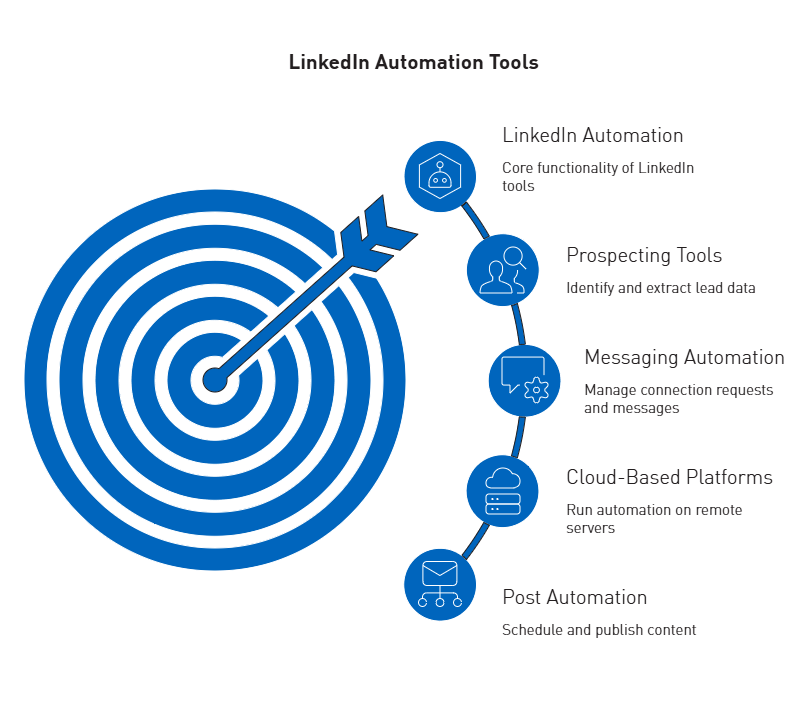
LinkedIn automation software falls into categories based on deployment method and primary function. Understanding these types helps businesses choose tools that fit their infrastructure, team size, and outreach goals.
 LinkedIn Prospecting Tools
Prospecting platforms identify and extract qualified lead data from LinkedIn. These tools use keywords and filters such as industry, company size, and job title to find top prospects. Advanced solutions offer access to extensive databases with hundreds of millions of contacts and companies, supporting detailed filtering.
Data enrichment distinguishes advanced prospecting tools from basic ones. Leading platforms provide verified emails, direct phone numbers, and comprehensive profile data. Some use AI search engines to find leads based on ideal profiles, enhancing data accuracy and quality.
LinkedIn Sales Navigator serves as the foundation for serious prospecting efforts. The platform offers advanced search filters beyond basic LinkedIn search, including seniority level, company headcount changes, and recent job changes. Lead recommendations surface prospects matching saved search criteria, while saved searches automatically update with new prospects. However, Sales Navigator functions primarily as a research layer without exporting direct contact data.
LinkedIn Messaging Automation Tools
Messaging automation manages repetitive tasks such as sending connection requests, personalized messages, and follow-ups. These tools automate profile viewing, connection requests, LinkedIn messages, InMails, and follow-up scheduling.
Advanced platforms support drip campaigns with built-in reply detection, ensuring contacts do not receive automated messages after responding. Sequencing can include multiple actions and conditions based on prospect behavior.
Multi-channel capabilities extend outreach beyond LinkedIn, integrating email and X (Twitter) to boost response rates. Conversation management features allow users to read, sort, archive, and label messages, similar to an email inbox.
Cloud-Based LinkedIn Automation Platforms
Deployment architecture affects performance and account safety. Cloud-based LinkedIn automation runs on remote servers, managing tasks without requiring devices to stay on. These platforms operate continuously, enabling consistent outreach without manual effort.
Cloud solutions often include AI-driven personalization and analytics dashboards. Each account receives a dedicated IP address, and activity warmup gradually increases daily limits for new users. Human-like delays and randomized actions help reduce detection risk.
Browser-based tools operate as extensions within web browsers, mimicking human behavior on LinkedIn. These require computers and browsers to remain active during campaigns, limiting scalability and increasing detection risk.
Desktop-based tools are installed locally and support complex campaigns and multi-account management, offering greater control over data and automation. However, they require installation, updates, and are limited to a single device.
LinkedIn Post Automation Solutions
Content automation helps maintain a consistent LinkedIn presence without manual posting. Post automation platforms enable planning, collaboration, and publishing for higher engagement. Scheduling features and AI assistants support timely, effective content creation.
Advanced platforms include idea generators that deliver tailored post concepts for specific niches. AI content creators allow users to select topics, tone, and language, producing customized drafts. Some solutions offer access to extensive libraries of viral posts, filterable by various criteria.
Analytics features provide key metrics such as optimal posting times, top-performing content types, average engagement rates, and posting frequency. The first 60-120 minutes after posting are critical for maximizing reach.
Free LinkedIn Automation Tools vs Paid Options
Free LinkedIn automation tools generally offer up to 80 invitations per month and basic features. Waalaxy provides a useful free tier, and some Chrome extensions support basic connection requests and message scheduling. Free options are suitable for individuals testing automation before upgrading.
However, free tools often lack advanced targeting, personalization, and analytics. Some free browser extensions may pose security risks or violate LinkedIn’s terms of service. Most free options offer limited support and carry a higher risk of triggering anti-spam measures.
Paid platforms provide advanced targeting, personalization, A/B testing, and analytics. They use measures to mimic human behavior, reduce detection risk, and offer dedicated support. Integrations with CRMs and marketing tools support enterprise-scale use, with higher monthly limits than free tiers.
Pricing models vary substantially across platformPricing varies widely. Desktop-based solutions start at USD 15.00 per month. Mid-tier cloud platforms range from USD 29.00 to USD 199.00 monthly, while enterprise solutions cost between USD 215.00 and USD 895.00.ion
Choosing among many platforms requires identifying LinkedIn automation tools that deliver results without risking account restrictions. The following five solutions offer varied price points and features, each suited to different team sizes, budgets, and outreach needs.
Tool 1: Overview and Core Capabilities
Expandi operates as a cloud-based LinkedIn automation platform known for smart sequences, dual-channel outreach combining LinkedIn and email, and Hyperise integration for personalized images. The platform serves 15,000+ customers globally, prioritizing account safety through dedicated IP addresses for each user, randomized delays between actions, and smart limits. Cloud-based operation enables 24/7 campaigns without keeping computers running.
Tool 1: Key Features
Expandi offers dual-channel LinkedIn and email sequences, Hyperise integration for dynamic images, and smart sequences that adapt to recipient behavior. The platform includes cloud-based infrastructure with dedicated IPs, A/B testing for campaigns, and advanced personalization capabilities. Integration support extends to HubSpot, Salesforce, Pipedrive through native connections plus webhooks and Zapier for custom workflows. Mobile Connector generates 100+ connections weekly through mobile-like behavior patterns harder for LinkedIn to detect.
Tool 1: Pricing and Plans
Business tier pricing sits at USD 99.00/month per seat, reduced to USD 79.00 with annual billing. Custom agency pricing becomes available for 10+ accounts. The platform provides a 7-day free trial. At USD 99.00/seat, costs accumulate quickly for teams, representing a consideration for budget-conscious organizations.
Tool 1: Best Use Cases
Sales teams and agencies prioritizing safe, scalable, automated multichannel outreach benefit most from Expandi’s architecture. The dedicated, country-specific IP address and smart account warm-up feature help automation activity appear natural to LinkedIn’s algorithms. Organizations experienced with LinkedIn restrictions in the past find Expandi’s safety-first approach particularly valuable.
Tool 2: Overview and Core Capabilities
Dripify functions as a dedicated LinkedIn automation tool designed for sales teams creating sophisticated drip campaigns. The visual, drag-and-drop campaign builder maps complex sequences involving connection requests, messages, InMails, and profile interactions. Cloud-based safety features include dedicated regional IPs, human-like behavior patterns, and scheduling controls. Team collaboration capabilities encompass shared inbox functionality and detailed analytics.
Tool 2: Key Features
The platform provides LinkedIn and email sequences automating profile visits, connection requests, messages, InMails, and email follow-ups. Personalization variables exceed 20 options for human-feeling outreach, while AI icebreaker suggestions enhance connection requests. The smart inbox enables direct LinkedIn message replies inside Dripify. Analytics and reports deliver detailed campaign performance insights. Webhook integrations support over 1,000 apps through Zapier.
Tool 2: Pricing and Plans
Annual billing provides 35% savings across three tiers. Basic costs USD 39.00/user/month with 20 connection requests and 30 messages daily. Pro reaches USD 59.00/user/month offering 50 connection requests and 75 messages daily. Advanced tier sits at USD 79.00/user/month with 75 connection requests and 100+ messages daily. The platform offers 7-day free trials on all plans. Monthly pricing without annual commitment starts at USD 79.00.
Tool 2: Best Use Cases
Agencies new to LinkedIn automation requiring intuitive interfaces with strong safety features at competitive pricing find Dripify suitable. The visual campaign builder facilitates team collaboration and optimization. Organizations needing structured outbound sales efforts with clear workflow visualization benefit from the flowchart-style interface.
Tool 3: Overview and Core Capabilities
Waalaxy combines LinkedIn and email outreach into a single platform, automating connection requests, follow-ups, and multichannel campaigns with verified, GDPR-compliant contacts. The drag-and-drop interface simplifies campaign building while the built-in CRM organizes all interactions. Cloud-based execution runs campaigns continuously without keeping Chrome open.
Tool 3: Key Features
The platform automates LinkedIn connection requests, profile visits, messages, and follow-ups. Multichannel sequences combine LinkedIn actions and email outreach in unified workflows. Built-in email finder with native enrichment retrieves professional addresses. Unified inbox manages LinkedIn and email replies centrally. AI writing assistant Waami helps generate and optimize outreach messages.
Tool 3: Pricing and Plans
Pro without inbox costs USD 21.00/month annually, limited to 300 connection requests monthly. Pro with inbox reaches USD 43.00/month annually with the same 300-request limit. Advanced tier costs USD 66.00/month annually, removing artificial caps for unlimited requests. Business tier at USD 88.00/month annually adds email automation with 800 LinkedIn invitations plus 500 email credits monthly. Elite package extends to USD 273.00/month.
Tool 3: Best Use Cases
Teams wanting visual flowcharts with unlimited LinkedIn requests select Waalaxy Advanced. The flowchart builder aids team collaboration, while customer support consistently rates higher than competitors. Organizations requiring built-in email finder capabilities avoid separate enrichment tool expenses.
Tool 4: Overview and Core Capabilities
PhantomBuster operates as a cloud-based automation and data extraction platform extending beyond simple LinkedIn outreach. The platform offers a massive library of individual automations called ‘Phantoms’ for tasks like scraping profiles, auto-connecting, or extracting group members. Multi-step ‘Workflows’ chain Phantoms together, enabling sequences that scrape LinkedIn group members, enrich profiles with professional emails, and send clean data directly to CRMs.
Tool 4: Key Features
Over 100 pre-built automations cover platforms beyond LinkedIn, including Sales Navigator, Twitter, and Google Maps. The drag-and-drop Workflow builder creates custom, multi-step automation sequences without coding. Native integrations connect HubSpot, Salesforce, and Zapier. API-first approach enables full API access to build custom workflows and track results.
Tool 4: Pricing and Plans
Usage-based pricing calculates on execution time, Phantom slots, and credits for services like email discovery. Starter plan costs USD 56.00/month annually (USD 69.00 monthly) with 20-hour monthly execution time. Pro plan reaches USD 128.00/month annually with 80 hours. Team plan costs USD 352.00/month annually providing 300 hours. Paid plans start at USD 69.00/month, extending to USD 439.00/month. A 14-day free trial tests capabilities.
Tool 4: Best Use Cases
Tech-savvy marketers and sales teams needing versatile toolkits for multi-platform automation benefit from PhantomBuster’s flexibility. Teams requiring complex data enrichment and multi-channel prospecting strategies leverage the Workflow builder. Organizations automating across Instagram, Twitter, GitHub, and Google Maps beyond LinkedIn find unique value.
Tool 5: Overview and Core Capabilities
Dux-Soup represents one of the market’s longest-standing linkedin automation tools, known for reliability and flexible deployment options. Operating primarily as a Chrome extension, it mimics human behavior by running directly in browsers. Cloud Dux plan runs campaigns from dedicated IP addresses, reducing detection risk and eliminating the need to keep computers on. The platform favors solopreneurs and small sales teams seeking straightforward automation for profile visits, connection requests, and message sequences.
Tool 5: Key Features
The extension builds multi-step drip campaigns including endorsements, follows, and InMails. Unlimited concurrent campaigns support up to 12 actions: Endorse, Follow, InMail, Connect, Message, Visit, and Like posts. Detect responses and pause campaigns functionality prevents wrongful messaging. Direct, native integrations connect HubSpot and Pipedrive, plus broader connectivity through Zapier and Make. Customizable time delays between actions and drag-and-drop campaign steps enhance control.
Tool 5: Pricing and Plans
Pro Dux costs USD 14.99/month (USD 11.25/month annually) for basic connection invitations and messages. Turbo Dux reaches USD 55.00/month (USD 41.25/month annually) adding unlimited drip campaigns, statistics, and CRM integrations. Cloud Dux costs USD 99.00/month (USD 74.17/month annually) for cloud-based infrastructure and always-on activity. Plans start at USD 14.99/month according to alternative sources. A free plan with limited profile visiting capabilities exists.
Tool 5: Best Use Cases
Individuals and sales teams wanting flexible tools that run locally via browser extension or in the cloud select Dux-Soup. The choice between browser-based extension for direct control and cloud-based version for 24/7 operation addresses different workflow needs. Organizations prioritizing native CRM integrations without middleware benefit from direct HubSpot and Pipedrive connections.
Top Strategies for Effective LinkedIn Automation
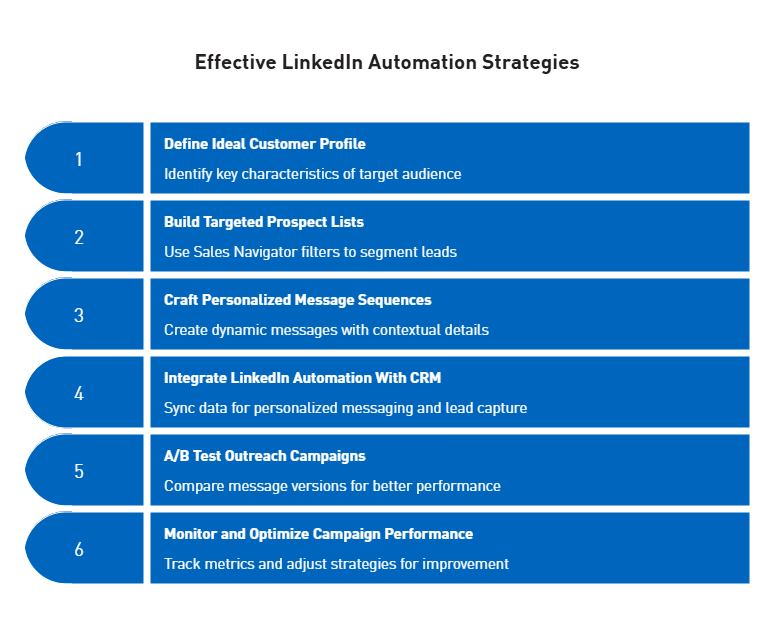
Effective implementation distinguishes successful LinkedIn outreach automation from wasted effort. The following strategies help maximize conversions while maintaining account safety.
 Building Targeted Prospect Lists
Effective prospecting begins with defining an ideal customer profile, including industry, job title, company size, location, and seniority. Sales Navigator filters leads quickly, while advanced users add behavioral indicators such as recent job changes or active posting. Segmenting by group membership, content engagement, or company growth stage can significantly increase revenue.
Crafting Personalized Message Sequences
Personalized LinkedIn messages boost response rates by up to 112% compared to gePersonalized LinkedIn messages can increase response rates by up to 112% over generic outreach. Effective sequences use dynamic fields and contextual details from profiles and recent activity. A typical structure includes a connection request, a welcome message, and value-driven follow-ups. Most prospects require 5 to 8 touches before responding.
Tools like SalesMind AI report high reply and acceptance rates through AI-driven analysis.er week, with recommendations to stay under 60-80 weekly for non-Sales Navigator users. Regular accounts should send 50-100 connection requests daily and 20-50 messages daily. Exceeding limits triggers account restrictions and decreased profile visibility. New accounts require 30-day warm-up protocols starting with 5 daily connection requests, gradually increasing to 20 by Day 22.
Integrating LinkedIn Automation With Your CRM
CRM integration can raise response rates from 2.8% to 6.5% through personalized messaging and reduce sales cycles by 30%. Automated lead capture imports key data into CRMs, saving time. Bidirectional syncing ensures complete prospect views and prevents lead loss.
A/B Testing Your Outreach Campaigns
A/B testing compares two message versions to identify which performs better. Each variation should have at least 100-200 interactions for reliable results. Mentioning recent company achievements in connection requests often yields higher acceptance rates.
Monitoring and Optimizing Campaign Performance
Acceptance rates below 30% suggest targeting issues, while response rates above 30% with 40% positive replies indicate effective messaging. Qualified lead conversion rates for B2B campaigns typically range from 5-15%. Teams should monitor cost per lead and ROI using real-time dashboards.
Choosing the Right LinkedIn Automation Software for Your Business
 Safety and Compliance Considerations
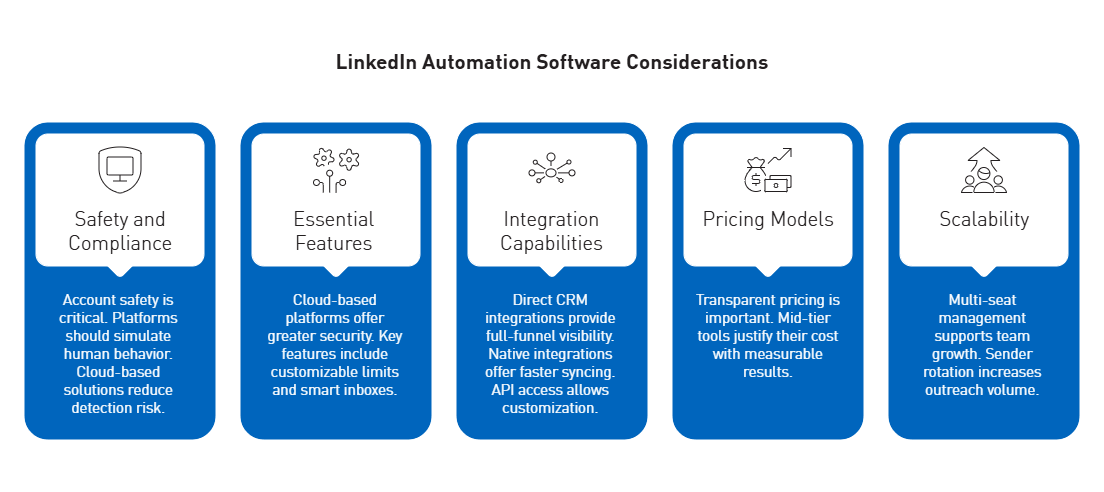
Account safety is critical when choosing LinkedIn automation tools. LinkedIn monitors for unusual activity, with detection systems highly accurate at identifying automation. Platforms should simulate human behavior with randomized actions, adjustable intervals, and rest periods. Cloud-based solutions with dedicated IPs or managed proxies reduce detection risk. Monitoring account health and using safe mode to pause campaigns when metrics decline is essential.
Essential Features to Look For
Cloud-based platforms offer greater security and reliability than browser-based tools. Key features include customizable daily limits, smart inboxes with tagging and snooze functions, and dynamic personalization using unique profile details. Effective rate limiting ensures responsible automation.
Integration Capabilities
Direct CRM integrations with HubSpot, Salesforce, and Pipedrive provide full-funnel visibility without middleware. Native integrations offer faster, more reliable syncing than third-party connectors. API access allows advanced customization and control.
Pricing Models and ROI Assessment
Transparent pricing is as important as features. Mid-tier tools justify their cost with measurable results, while budget options may compromise safety. Assess ROI by considering time savings, with automation often recovering 10 or more hours weekly.
Scalability for Growing Teams
Multi-seat management with role-based permissions, shared templates, and campaign cloning supports team growth. Sender rotation distributes leads across accounts, maintaining safe limits and increasing outreach volume.
Conclusion
LinkedIn automation tools can significantly improve B2B lead generation when used strategically. Success depends on choosing platforms that prioritize account safety with cloud infrastructure, dedicated IP addresses, and human-like activity. Teams should emphasize personalized messaging, safe daily limits, and CRM integration for optimal results.
Currently, options range from affordable browser extensions to enterprise cloud platforms. The best choice depends on team size, budget, and outreach complexity. Begin with clear customer profiles, use A/B testing for message optimization, and monitor performance metrics. Automation delivers measurable ROI when strategy and technology are aligned.